Automate Cheerful with AI agents
4 min readView as Markdown
Cheerful has two machine-facing surfaces. The first is a remote MCP server: add it as a connector in Claude, ChatGPT, Cursor or any MCP client, sign in with your Cheerful account, and the assistant can read your campaigns, your replies, your creator lists and your credit balance — and search creators — on your behalf. The second is a command-line interface, so the same work scripts.
Both authenticate as you, and the difference between them matters. Most of the tools every account gets only read data. creator_search and save_creators_to_list change data: creator search spends credits and, for YouTube, saves results to a new list, and saving creators writes to your own lists (free). The campaign tools, switched on per account, create and edit drafts; a campaign is sent only when the user clicks Confirm & send on the launch card. No other tool sends a message to a creator. The CLI is not read-only. It drives the same API the web app does, which means it can create a campaign, launch one, send an email and spend credits. Treat a terminal session with the same care you would treat being logged in.
Cheerful runs a remote MCP server at mcp.cheerful.ai/mcp and publishes a command-line interface, so an AI assistant or a script can read your influencer campaigns, replies and creator lists using your own Cheerful account.
Three doors
Connect Cheerful to Claude and ChatGPT
The MCP connector: one URL, an OAuth sign-in, and the tools your assistant can call. Setup takes about a minute.
Every tool the connector exposes
The connector tools with their arguments, what comes back, what it costs — and the traps, which is the part nobody else publishes.
Run Cheerful from your terminal
The CLI: install with npm, sign in through the browser, 25 command groups, JSON output by default. Not read-only — it launches and sends.
Sign in to the Cheerful CLI
How authentication actually works, why there is no API key to paste, and what that means for unattended scripts.
If you are an AI agent acting for a user
What Cheerful costs, how to get your user started with their brief carried over, and what to tell them.
What an agent can actually do with this
The interesting half is not creator search. Every influencer platform has search, and a lookup tool bolted onto an assistant is still a lookup tool. What the Cheerful connector exposes that no comparable platform does is the operational half of the job: the campaigns you are running, the mailboxes they send from, the replies that came back, the creators who opted in, and the credits it all consumed.
That changes the kind of question you can ask. "Find me fitness creators" is a search. "Which of my campaigns has the worst reply rate this month, and which mailbox is it sending from?" is a question about work in progress, and it needs four different systems to answer. Through the connector it is one sentence.
| You ask | It reads |
|---|---|
| Which of my campaigns has the worst reply rate this month? | campaign_report |
| Who replied to me yesterday and what did they say? | inbox_read |
| Draft me a summary of every creator still waiting on an answer. | inbox_read |
| Which mailbox is the spring gifting campaign actually sending from? | campaign_read |
| How many creators opted in across all my campaigns this quarter? | campaign_report |
| Which creators posted for my campaigns? Show the top posts by views. | campaign_content |
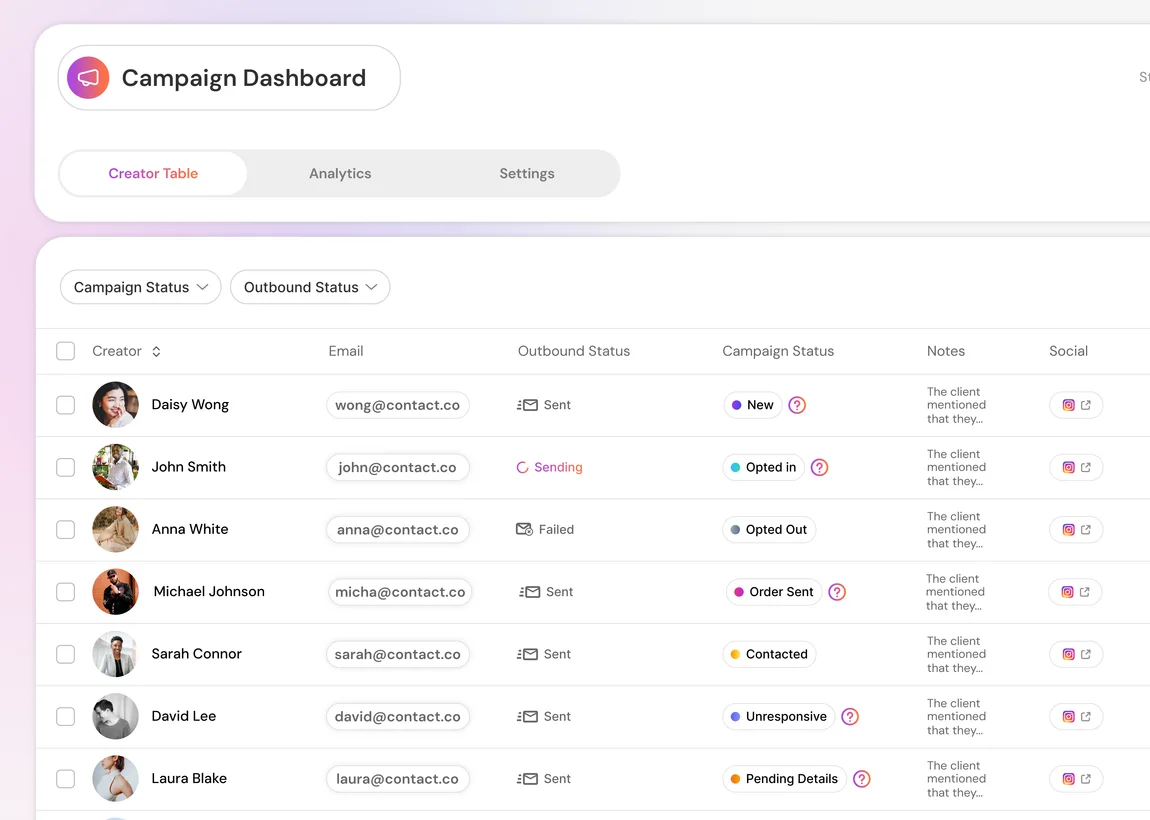
campaign_read and campaign_report read from. Demo account — the creators, the addresses and the dates are made up.Read-only, and why that is the right first step
Most of the tools every account gets are annotated read-only; creator_search and save_creators_to_list are not. Creator search spends credits and, for YouTube, saves results to a new list in your account; saving creators writes to your own creator lists and is free. That annotation is what a client uses to decide whether a call needs your approval. No tool accepts both safe and unsafe operations. An assistant cannot send a campaign by typing; a send needs a click on Confirm & send in the launch card.
That is a deliberate first phase rather than a limitation we are shy about. Outreach that goes out under your name is the part of this product that most deserves a human at the keyboard, and an assistant that can read everything and change almost nothing is the version of this worth shipping first. The campaign tools, which draft a campaign and preview its launch, are switched on per account while they roll out. Each is annotated on its own, and none of them can send without the Confirm & send click.
What it costs
Reads are free. Creator search consumes credits from the same balance the web app uses, at the same rate, because it is the same search. Nothing on this surface is billed separately for being called by an agent rather than by a human, and there is no developer plan to buy.
If a call comes back with a 402, that is your credit balance rather than a fault. billing_usage reports what is left and when it renews.
Guides for running the work itself
The pages above are about wiring Cheerful to something else. These are about the job: how outreach, replies and gifting actually run, written for the person doing them rather than the person integrating them. Each one states what the product does not do, which is usually the part worth reading first.
Which tools does Cheerful integrate with?
Every native integration and what it actually does, the 1,000+ catalogue apps the agent can connect, and what does not exist: no Outlook sign-in for sending, no Zapier, no public API.
Where does Cheerful find creators?
The four data sources behind discovery, the checks every creator passes, lookalike search and email finding.
How does Cheerful handle creator replies?
How replies are sorted, what the drafter reads, the three automation levels and when follow-ups stop.
Is it safe to send outreach from your own Gmail?
The per-mailbox daily pace, warm-up, send windows, the Google permissions requested and what stays your job.
Manage your campaigns from Claude or ChatGPT
The non-technical half of the connector: what an assistant can see, what it cannot do, and where it beats a dashboard.
Run outreach from your own Gmail
Sending from your own mailbox rather than a platform relay, a Google Sheet as the roster, and the limits that apply.
Reply to influencer emails automatically
What gets read before a reply is drafted, where approval sits, and when to take the thread back.
Track gifting from shipment to ROI
Per-creator codes, draft orders, post detection — and the honest limits of attributing gifting revenue.
FTC disclosure rules
What counts as a material connection, what "clear and conspicuous" means per format, and where the brand's liability sits.
What this does not do
- Most of the tools every account gets only read data. Creator search spends credits and, for YouTube, saves results to a new list;
save_creators_to_listsaves creators to your own lists for free. The campaign tools, switched on per account, create and edit drafts, and a campaign is sent only when the user clicks Confirm & send on the launch card. No tool places a gifting order. - The CLI is not read-only, and that is worth saying plainly: it can create and launch campaigns, send email, edit drafts and spend credits, because it calls the same API the web app calls.
- Neither surface reaches more than your own account does — your own work plus whatever your teams share. Neither can reach another customer’s data, or data your own login is not entitled to.
- A smart creator search takes about a minute and a cold creator profile around 60 seconds. Some clients will time out before we answer.
- There is no API key to paste. Both surfaces authenticate through a browser sign-in, which means unattended use — CI, cron, a shared runner with no browser — is not supported today.
- The CLI is published for macOS (Apple Silicon and Intel), Linux x64 and Windows x64. There is no Linux arm64 build.
Frequently asked questions
For the MCP connector, no. It is a URL you paste into Claude’s or ChatGPT’s connector settings and a sign-in you complete in your browser. The CLI is a developer tool and assumes a terminal.
No. There is no developer plan and no per-call charge. Reads are free; creator searches consume the same credits the web app does.
No. Most of the tools every account gets only read data. Creator search spends credits and, for YouTube, saves results to a new list;
save_creators_to_listsaves creators to your own lists for free. The campaign tools, switched on per account, create and edit drafts, and a campaign is sent only when the user clicks Confirm & send on the launch card. Messages in the Cheerful web app can also be held for one-click approval.Any client that speaks the Model Context Protocol over streamable HTTP with OAuth. That includes Claude, ChatGPT, Cursor, VS Code and Windsurf.
Yes. Each person connects with their own Cheerful account and sees exactly what that account is entitled to see, including campaigns their teams share with them.
Was this page helpful?